

Clash Detection in Revit: Enhancing Accuracy in 3D Laser Scanning and BIM Modeling
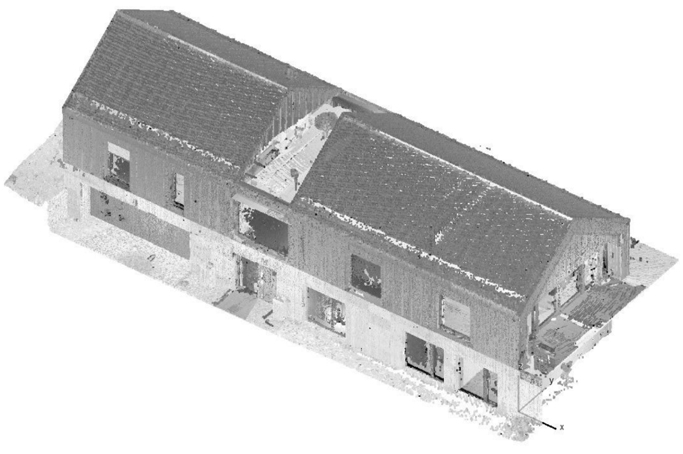

In the ever-evolving world of digital construction and Building Information Modeling (BIM), the integration of 3D laser scanning with powerful software like Autodesk Revit has revolutionized the way professionals plan, design, and manage building projects. One of the most crucial elements in this workflow is clash detection – a process that identifies conflicts between different elements in a 3D model before construction begins.
In this article, we explore the role of clash detection in Revit, particularly when combined with data from laser scanning and 3D modeling, highlighting its impact on project accuracy, efficiency, and cost-effectiveness. This insight is especially relevant for professionals in architecture, engineering, and construction who are seeking to minimize risk, optimize workflows, and enhance collaboration through intelligent design technologies.
What Is Clash Detection?
Clash detection is the process of identifying spatial conflicts in a BIM environment. These conflicts, or “clashes,” occur when elements from different disciplines – such as structural, mechanical, electrical, and plumbing systems – overlap or interfere within the same physical space.
There are three primary types of clashes:
- Hard clashes: Physical overlaps, such as a beam intersecting a duct.
- Soft clashes: Elements that violate required clearances or tolerances.
- Workflow clashes: Scheduling or sequencing conflicts, such as one trade needing access to an area that’s already occupied by another.
Clash detection plays a critical role in identifying these issues early, allowing teams to coordinate design decisions before the building process begins. This reduces delays and unexpected costs during construction.
Why Revit for Clash Detection?
Autodesk Revit is a leading BIM tool used for modeling architectural, structural, and MEP systems in a unified environment. Discover our full range of BIM Modeling Services that integrate seamlessly with Revit and laser scanning. When integrated with 3D laser scan data, Revit allows for:
- Accurate as-built modeling from point clouds
- Real-time collaboration across disciplines
- Efficient identification and resolution of conflicts
- Improved documentation and coordination
Tools like Navisworks, often used alongside Revit, enhance the clash detection process by providing detailed visualizations and customizable clash rules. These software tools can simulate entire construction sequences and provide valuable insights for conflict resolution and design refinement.
Learn more about how clash detection is implemented in complex MEP environments in our article:
Expert Revit 3D Modeling Services for Buildings and MEP Systems.
Laser Scanning + Revit = Seamless Clash Detection
3D laser scanning provides highly accurate spatial data of existing structures, generating a dense point cloud with precision up to a few millimeters. Once imported into the Revit environment, this point cloud becomes a reliable reference for the entire design process.
The point cloud in Revit can be used for:
- Renovation and reconstruction projects – enables precise reproduction of the existing geometry, allowing the new design to be developed in a realistic context and with full geometric consistency;
- Verification of discrepancies between the design and reality – by overlaying the BIM model on the scanned data, deviations and installation errors can be quickly identified (deviation analysis);
- Accurate alignment of new and existing elements – facilitating better planning of structural connections, MEP installations, and prefabricated components.
Integrating laser scanning with Revit allows for advanced clash detection already at the design stage. Project teams can compare the actual condition of the structure with the theoretical model and detect potential clashes between structural, MEP, and architectural elements. This enables:
– resolving conflicts before construction teams enter the site,
– reducing the number of RFIs and design changes,
– improving scheduling and cost estimation,
– generating reliable as-built documentation.
This approach significantly improves project quality, shortens construction timelines, and helps avoid costly rework during execution.
See how combining 3D scanning with BIM can prevent errors and reduce project costs in our article:
Benefits of Clash Detection in BIM Workflow

Implementing clash detection early in the design process significantly enhances project outcomes. Key benefits include:
1. Cost Savings
Avoiding rework and material waste due to design conflicts can lead to substantial savings. Clash detection minimizes the need for on-site corrections and change orders.
2. Improved Efficiency
Identifying clashes ahead of time streamlines construction schedules and reduces delays. Early detection supports better sequencing and task planning.
3. Enhanced Collaboration
Revit’s centralized model enables real-time updates and coordination among stakeholders. Everyone works from the same source of truth, promoting transparency and accountability.
4. Increased Accuracy
Laser scanning ensures that the model reflects actual conditions, minimizing assumptions and errors. The result is a model that supports both design intent and constructability.
5. Risk Reduction
By anticipating and resolving conflicts during the design phase, projects face fewer uncertainties during construction, lowering overall risk exposure.
Best Practices for Clash Detection in Revit
To fully leverage Revit’s capabilities in clash detection and multidisciplinary coordination, it is worth applying the following principles:
- Work with well-organized and up-to-date BIM models;
- Incorporate point cloud data at the early design stage to minimize the risk of discrepancies with the actual conditions;
- Regularly perform clash checks between architectural, structural, and MEP elements;
- Establish clear communication and conflict-flagging procedures between teams;
- Document all detected issues and applied solutions to improve workflows in future project stages.
By following these practices, design conflicts can be identified and resolved early – before construction begins – leading to cost savings, shorter schedules, and higher quality outcomes.
Conclusion
Clash detection in Revit, especially when paired with 3D laser scanning, is a game-changer for the AEC industry. It helps prevent costly mistakes, improves collaboration, and ensures the delivery of high-quality, coordinated construction documentation. As BIM technologies continue to evolve, mastering clash detection becomes an essential skill for project teams aiming to deliver precision, efficiency, and value.
Whether you’re planning a renovation, managing a complex MEP layout, or working on a large-scale infrastructure project, Revit’s clash detection capabilities provide the foresight and precision needed for successful execution.
Need help with Revit clash detection or laser scanning?
Contact Scan M2 today for expert support in BIM coordination and 3D modeling solutions.

