

Revit MEP BIM Services for Accurate System Modeling and Engineering Coordination
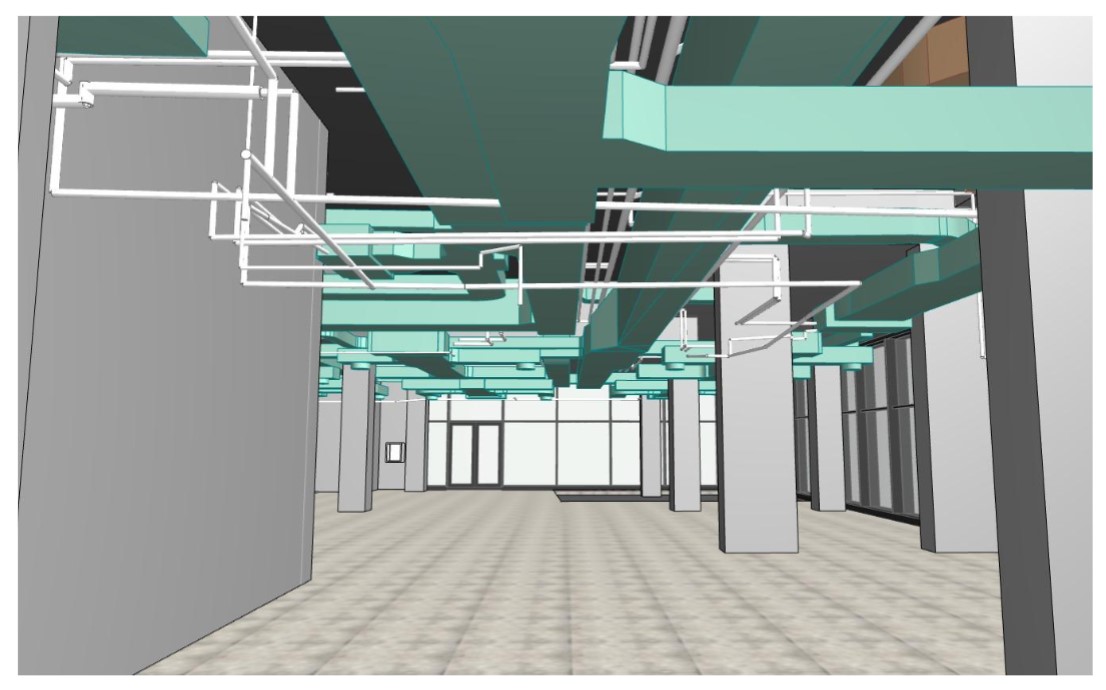
Revit MEP BIM is used to develop coordinated engineering models for projects where HVAC, plumbing, and electrical systems must work within a single digital environment. At ScanM2, we use Revit MEP modeling to help project teams align engineering layouts with architecture, structure, and real project constraints.
Revit MEP modeling is especially valuable in projects with limited ceiling space, dense service zones, renovation conditions, or complex technical rooms. In these cases, the model is not just a design file. It becomes a working coordination tool that supports engineering decisions throughout the project.
Contact Us Now for a Free Consultation!
What Revit MEP BIM Includes
A Revit MEP model typically combines the main engineering systems into one coordinated BIM environment. Depending on project scope, it may include:
- HVAC systems
- plumbing systems
- electrical systems
- ducts and piping routes
- cable trays
- equipment placement
- risers and shafts
- plant rooms
- ceiling service zones
- service connections between disciplines
The main value of this approach is that systems are reviewed in context, not separately. This makes it easier to identify routing conflicts, manage tight technical spaces, and maintain consistency across the engineering model.

Revit MEP Modeling for HVAC, Plumbing, and Electrical Systems
Revit MEP modeling is used to organize engineering systems in a way that supports both technical accuracy and project coordination. It helps the team see how systems are placed, how they intersect, and how much space is actually available for routing and installation.
For HVAC systems, the model supports:
- ductwork modeling
- equipment placement
- ceiling space coordination
- routing through service zones
- plant room organization
For plumbing systems, it helps structure:
- piping layouts
- riser development
- shaft coordination
- vertical routing
- connections between technical zones
For electrical systems, the model can support:
- cable tray modeling
- route planning
- equipment placement
- coordination in congested areas
- layout consistency across engineering spaces
By combining these systems in one BIM environment, project teams can review engineering layouts earlier and reduce the risk of conflicts during later design stages.

Role of a BIM MEP Modeler in the Project Workflow
A BIM MEP modeler is responsible not only for creating model geometry, but also for maintaining engineering logic and coordination quality throughout the workflow. This role becomes especially important when several systems must be aligned in the same space.
Typical responsibilities include:
- development of system layouts
- coordination with architecture and structure
- route updates during design development
- clash review support
- engineering model validation
- consistency of model data
- preparation of coordinated outputs for the project team
In more demanding projects, this role is closely linked with MEP BIM coordination, where the model must support practical decision-making across multiple disciplines rather than function as an isolated engineering file.

Revit MEP Modeling Services for Different Project Types
Revit MEP modeling services are used in a wide range of project scenarios. They are relevant not only for new construction, but also for projects where engineering systems must be adapted to existing spatial conditions.
Common use cases include:
- new construction
- renovation projects
- retrofit works
- engineering system upgrades
- adaptation of outdated service layouts
- coordination in limited ceiling zones
- technical room reconfiguration
In new construction, the model helps structure system layouts early and improve overall coordination quality. In renovation and retrofit projects, the model becomes even more useful because it helps the team work around existing walls, shafts, slabs, and previously installed services.
For broader service workflows, this topic also connects naturally with MEP BIM modeling services, especially where the project requires coordinated development across several engineering disciplines.
From Existing Conditions to a Coordinated Revit MEP Model
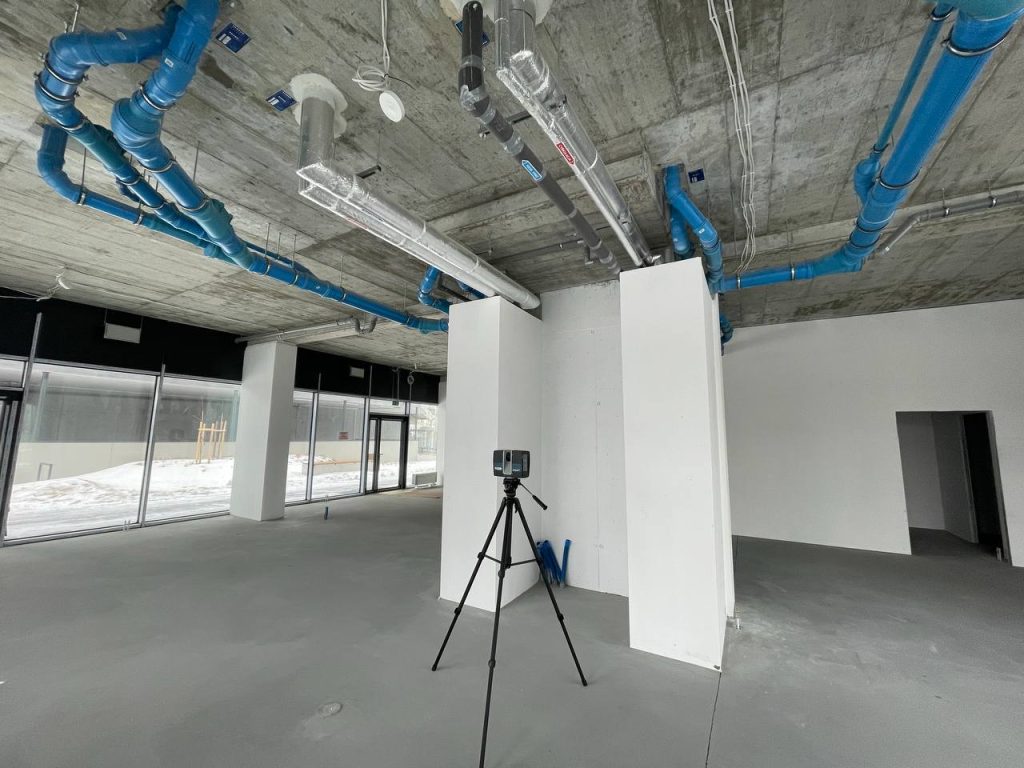
In real projects, engineering modeling usually starts with available source information rather than a blank file. Depending on the assignment, that source may include existing drawings, engineer markups, legacy documentation, or scan-based information.
A typical workflow includes:
- collection of available source data
- review of drawings, markups, and technical references
- point cloud review if available
- development of the Revit MEP model
- routing and coordination of systems
- clash review and model updates
- preparation of project deliverables
This sequence is especially important for renovation and retrofit works. When existing conditions differ from archived drawings, the model must reflect real project geometry as closely as possible. In such cases, scan-based inputs can significantly improve the reliability of the engineering model and reduce the number of assumptions during coordination.
Main Advantages of Revit MEP Services
Revit MEP services bring value not only through model creation, but through the way the model supports design, review, and project delivery. When used correctly, the engineering model becomes a central reference point for the full team.
Key advantages include:
- better routing accuracy
- improved system coordination
- earlier clash detection
- clearer engineering documentation
- support for construction planning
- easier model updates during design development
- stronger communication between disciplines
This is particularly important in projects where engineering density is high and small coordination mistakes can lead to major delays later. A structured model reduces uncertainty and gives the team a more reliable basis for technical decisions.
Revit MEP Projects for the USA and Region-Specific Delivery
Revit MEP projects are often shaped not only by technical scope, but also by delivery standards, client expectations, and documentation requirements. This is especially relevant in the USA, where project teams may expect a specific model structure, naming logic, coordination process, and output format.
Typical requirements may include:
- project-specific BIM standards
- structured engineering deliverables
- coordination with consultants
- coordination with contractors
- documentation aligned with client workflows
- consistent engineering model organization
Because of this, experience with market-specific delivery matters. The model must not only be technically correct, but also prepared in a way that fits the broader project environment. For commercial region-based workflows, this is directly related to MEP BIM services in the USA.
Typical Deliverables
The exact deliverables depend on project scope, stage, and client requirements. In most cases, Revit MEP services may include:
- coordinated Revit MEP model
- system layouts
- plans and sections
- engineering views
- schedules
- clash review support
- updated model files
- documentation for the project team
These outputs can support internal coordination, consultant review, design development, and preparation for later project stages.
Typical Revit MEP Output by Scope
| Scope | Typical Output |
|---|---|
| HVAC | duct layouts, equipment placement, coordinated routing |
| Plumbing | piping layouts, risers, shaft coordination |
| Electrical | cable trays, equipment zones, coordinated routes |
| Renovation | as-built-based engineering model |
| New construction | coordinated BIM model for design and delivery |
Why Revit MEP BIM Supports Better Engineering Coordination
The main strength of Revit MEP BIM is that it allows building systems to be developed inside the same digital environment as architecture and structure. Instead of resolving issues after design packages are already advanced, the team can review routes, equipment zones, shafts, and technical spaces earlier in the process.
This leads to several practical benefits:
- more predictable engineering layouts
- better visibility of spatial constraints
- fewer conflicts between systems
- improved coordination across disciplines
- more reliable documentation output
For projects with multiple engineering systems and complex routing conditions, this makes the BIM model an operational tool rather than a static project file.
Conclusion
Revit MEP BIM helps create accurate and coordinated engineering models for HVAC, plumbing, and electrical systems in both new and existing buildings. Revit MEP modeling improves routing logic, supports technical review, and gives the project team a clearer basis for engineering coordination.
At ScanM2, we apply this approach to projects where engineering accuracy, system coordination, and reliable deliverables are critical for design development and project delivery.

