
A WALKTHROUGH YOU CAN WORK IN
Virtual Walkthrough Software That Turns a Site Tour Into a Workspace
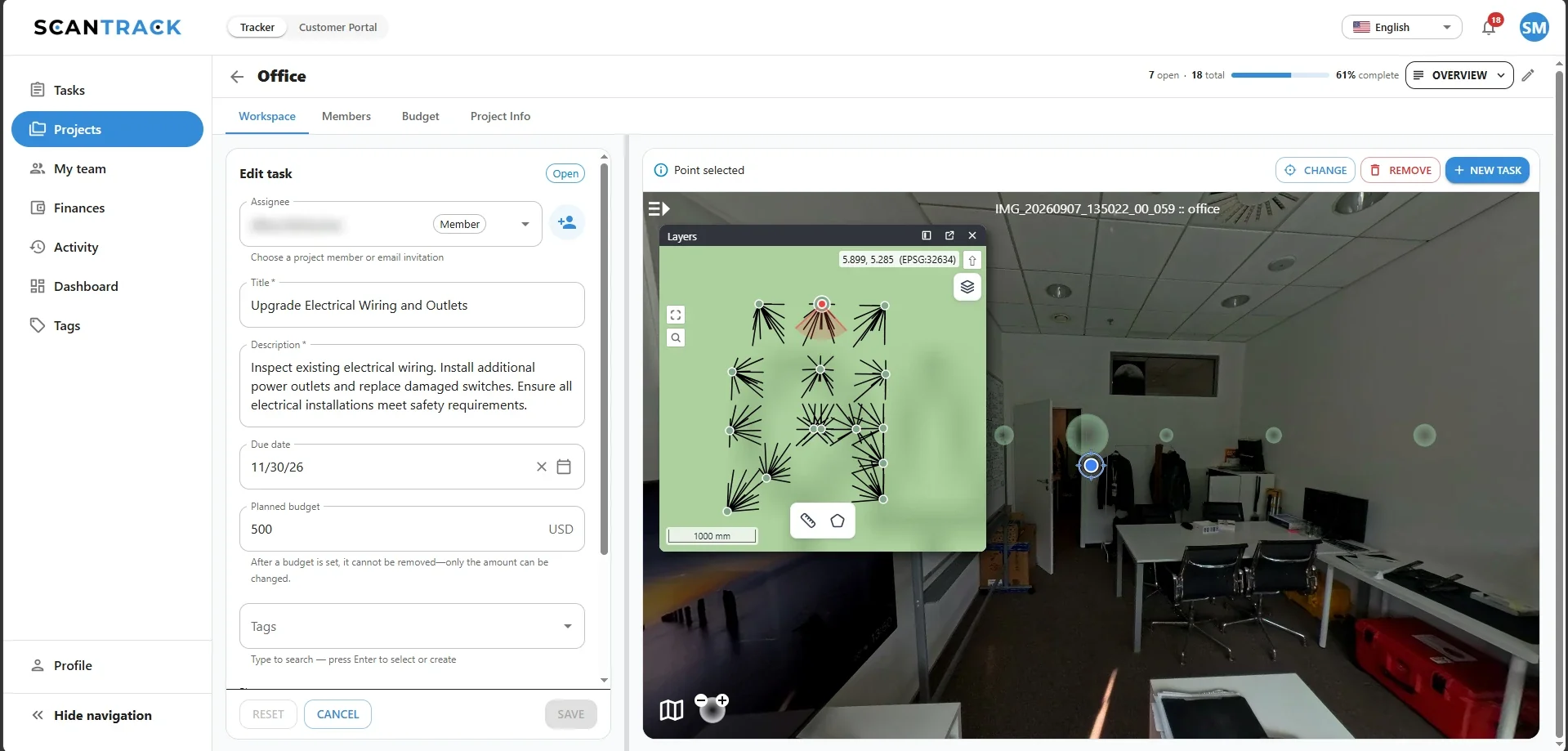
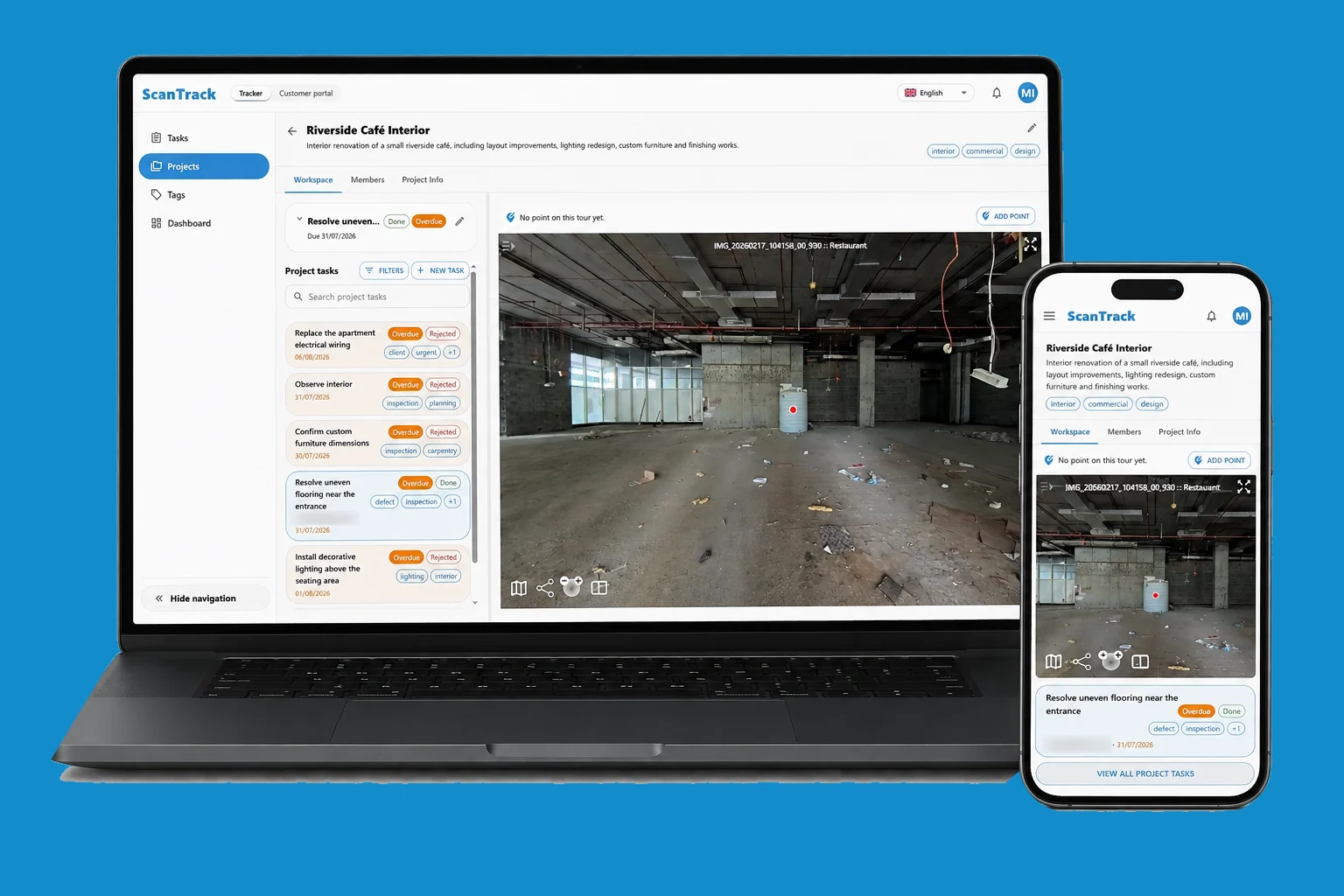
Most virtual walkthroughs are made to be looked at. ScanTrack makes them something your team can work in. Walk through an interactive 3D tour of a building, stop at any point, create a task right there and assign it to the person who has to act.
Everyone opens the same walkthrough in the browser, sees the same place and follows the same tasks – from the office, from home or from another country.
- Tasks pinned at exact points inside the 3D walkthrough
- Floor-plan minimap to move between rooms and floors
- Assignee, due date, status and photo evidence on every task
- Unlimited users and a 14-day free trial
WALKTHROUGH BASICS
What Is Virtual Walkthrough Software?
Virtual walkthrough software lets people move through a real space on a screen – room by room, with a full 360° view at each position. It is built from panoramic photos or laser scans captured on site, and it opens in a browser without special hardware.
For real estate, a walkthrough is mainly a presentation: it helps buyers or tenants see a property before they visit. For construction, renovation and facility teams the walkthrough has another job. It replaces trips to the site, answers "what does it look like there right now?" and becomes the shared reference for decisions.
ScanTrack is virtual walkthrough software for that second job. The tour is not the final product – it is the place where work is assigned, discussed and checked.
VIEWING VS WORKING
A Viewing Tour vs a Working Walkthrough
| Typical virtual tour | ScanTrack walkthrough | |
|---|---|---|
| Main purpose | Show a space to visitors | Coordinate work in a real space |
| What you add | Hotspots, descriptions, links | Tasks with assignee, due date, budget and tags |
| Who uses it | Buyers, tenants, visitors | Project managers, contractors, owners, facility teams |
| What happens next | Visitor contacts the agent | Task moves through open, in progress, done, overdue or rejected |
| Proof of result | Not needed | Photos or files attached to the task, approved or rejected with a comment |
If you need a walkthrough only to show a property, any tour viewer will do. If people have to act on what they see, the walkthrough needs tasks, owners and a history – and that is what ScanTrack adds.
How a Walkthrough Becomes a Workspace
Open the 3D tour of the site. Upload your own tour during the trial or let the ScanM2 team capture the building.
Walk to the spot. Move through the scan positions or jump to a room using the floor-plan minimap.
Create a task at the exact point. Click the place – an opening, a pipe, a wall, a piece of equipment – and add a title and a description.
Assign it. Choose the responsible person, set a due date, add tags such as floor, trade or priority, and a planned budget if the work has a cost.
Follow it to the end. The assignee sees the location in 3D, does the work and attaches photos or files. The reviewer approves the result or rejects it with a reason.
Every step stays in the task history, attached to the place in the walkthrough where it started.
3D Inspection Inside the Walkthrough
The walkthrough is a convenient way to look at a site in detail without being there. Reviewers can move from position to position, look up at ceilings, check corners and openings, and record every finding as a task at the exact point where they saw it.
This is useful when:
the site is far away or difficult to visit often;
several people need to see the same place – an owner, a designer, a contractor and a facility manager;
a question comes up after the visit and nobody remembers exactly what was behind that door;
work has to be planned before people arrive on site.
ScanTrack is about inspecting buildings and spaces in a 3D tour. It is not industrial metrology software for comparing manufactured parts with CAD models.
Where the Walkthrough Comes From
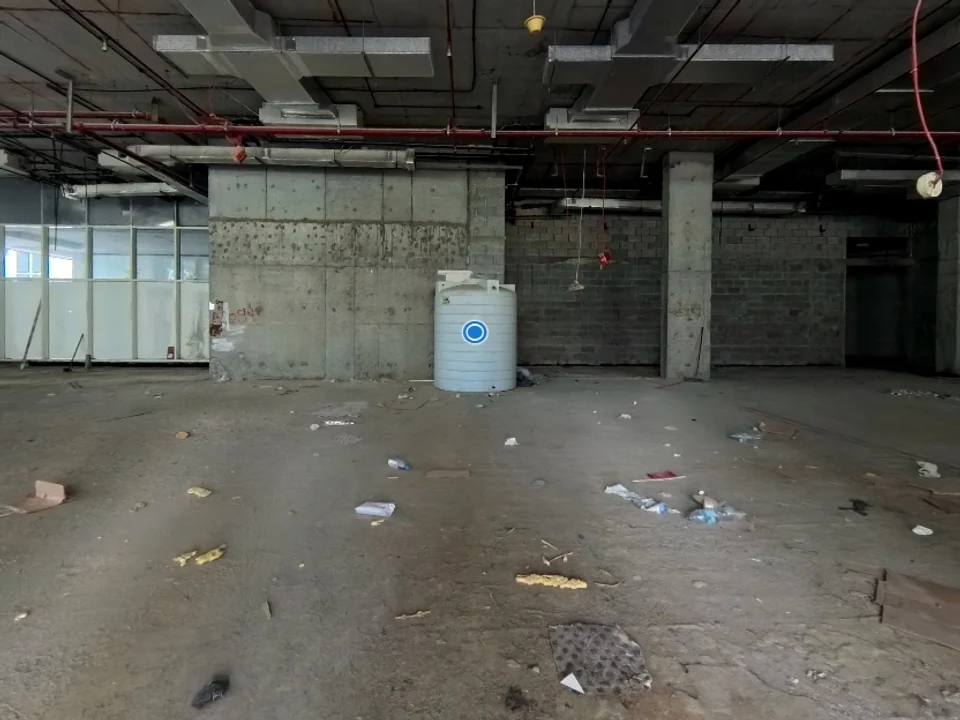
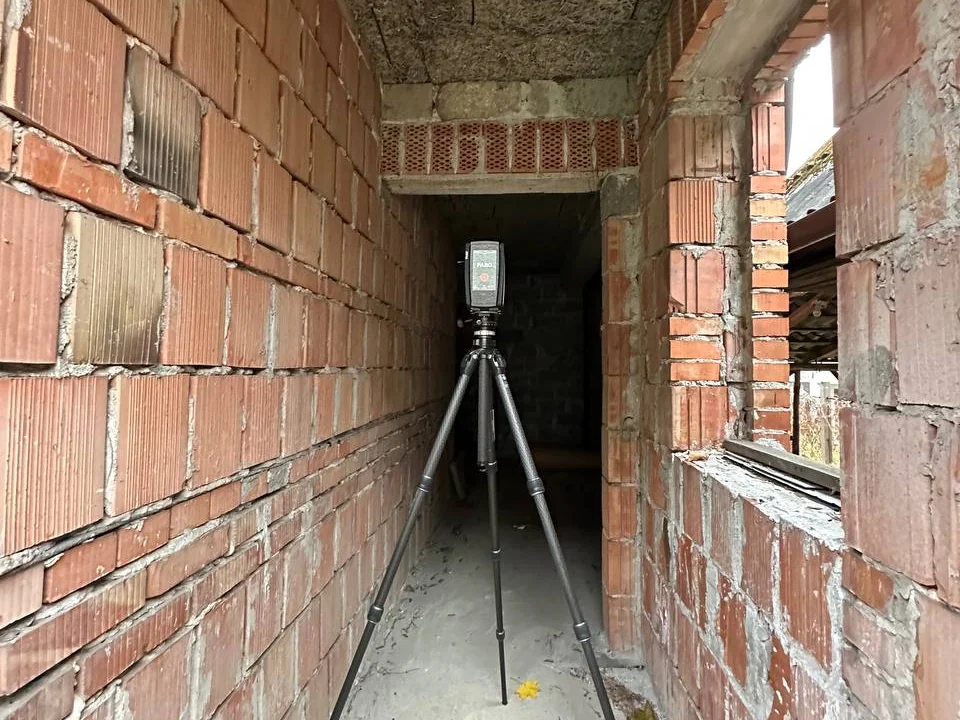
A ScanTrack walkthrough is based on a real capture of the site, not a 3D render. There are two ways to get one:
Use your own tour. During the 14-day free trial you can upload a tour of your site and test the workflow with your team.
Let ScanM2 capture the site. Our team scans buildings with professional laser scanners and 360° equipment and prepares the walkthrough for you. We work across the USA and Europe and travel to the project.
Because the walkthrough comes from a real capture, it shows the site as it was at that moment. When the work moves on, a new tour can be added.
Built for Teams, Not Just Viewers
A walkthrough helps only if everyone who needs it can open it. ScanTrack keeps access simple:
Unlimited users – invite contractors, consultants, owners and colleagues without counting seats.
Works in the browser on a laptop and on a phone, so the field and the office open the same walkthrough.
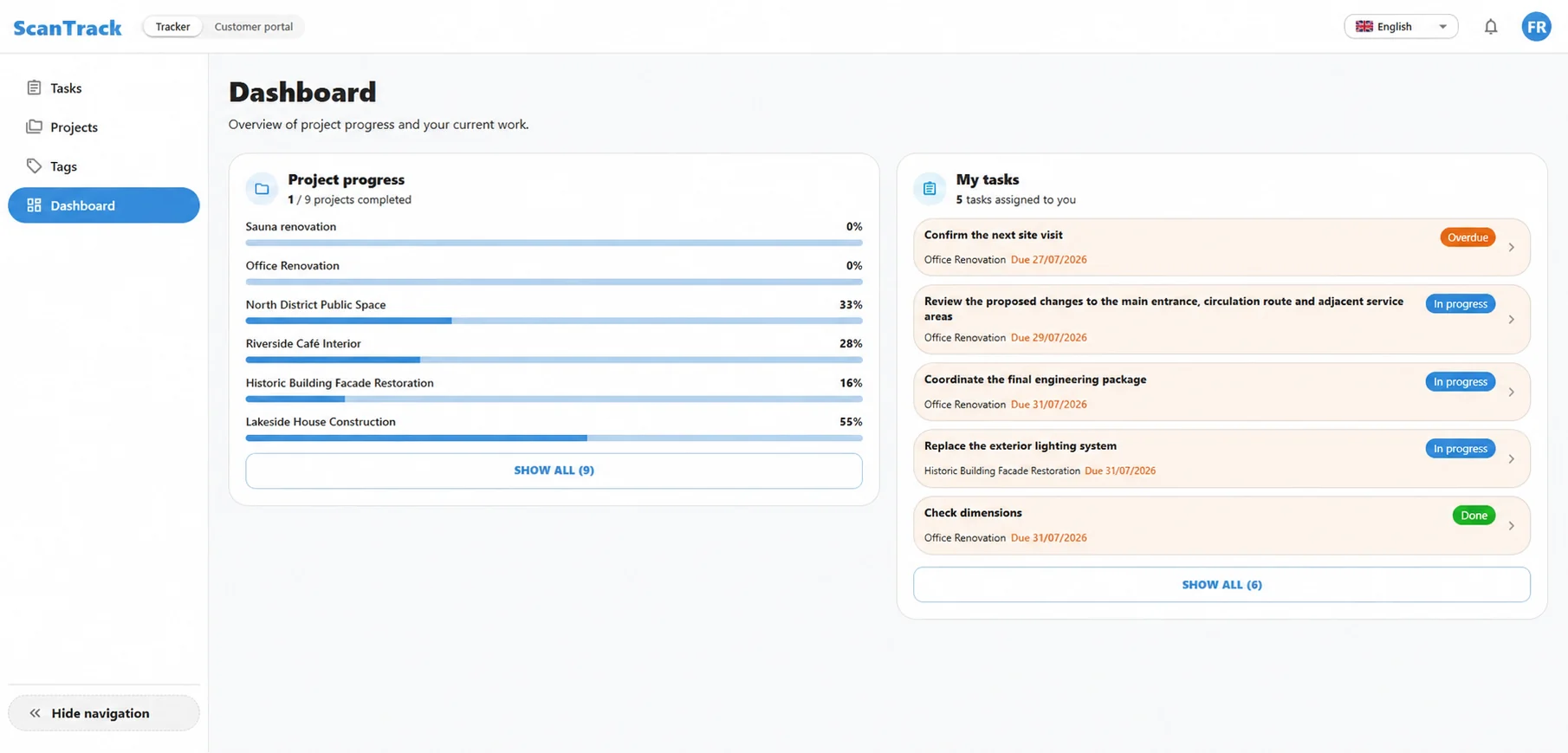
Dashboard with project progress and the tasks assigned to each person.
Statuses – open, in progress, done, overdue and rejected – so you see at a glance what still needs attention.
Comments and history on every task, so decisions do not get lost in messengers.
WHO IT IS FOR
Who Uses Virtual Walkthroughs in ScanTrack
Construction and fit-out teams
Coordinate work in a building without sending everyone to site.
Renovation and interior projects
Share the current state of an apartment, house or office with clients and contractors.
Property and facility managers
Keep issues and maintenance tasks attached to the exact place in the building.
Owners and developers
Check objects remotely and follow what is being done about each question.
Home and property inspectors
Mark findings at their location in a 3D tour and share them with the client.
Architects and designers
Review existing conditions and leave clear instructions at the right spot.
What a Virtual Walkthrough Can and Cannot Replace
A ScanTrack walkthrough reduces the number of site visits and makes remote coordination much easier. It does not replace every visit: some checks still need someone on site, and the tour shows the site at the time it was captured. ScanTrack does not detect defects automatically – people decide what needs attention, and the software keeps the work organised.
FAQ
Frequently Asked Questions
What is virtual walkthrough software?
It is software that lets you move through a real space on screen using 360° images or laser scans. ScanTrack adds task management to the walkthrough: tasks are pinned at exact points, assigned to people and tracked until they are done.
How is ScanTrack different from a regular virtual tour?
A regular tour is made for viewing. In ScanTrack every point of the tour can hold a task with an assignee, due date, status, budget, tags, photos and comments, so the walkthrough becomes a place where work is coordinated.
Can I use ScanTrack for 3D inspections?
Yes, for buildings and spaces. Reviewers can inspect the site in the 3D walkthrough and record findings as tasks at the exact location. ScanTrack is not intended for industrial CAD-based inspection of manufactured parts.
Do I need special equipment to view a walkthrough?
No. The walkthrough opens in a web browser on a laptop or a phone.
Where does the walkthrough come from?
You can upload your own tour during the free trial, or the ScanM2 team can capture the site with laser scanners and 360° equipment.
Can contractors and clients use the same walkthrough?
Yes. Users are unlimited, so you can invite everyone involved in the project and give them the same view of the site.
Can a walkthrough replace site visits?
It can replace many routine visits and questions, but not all of them. Some checks still require someone on site, and a tour shows the site at the time it was captured.
Is there a free trial?
Yes. ScanTrack can be tested free for 14 days with your own tour and your team. Commercial terms after the trial are agreed individually.

Make Your Walkthrough Do More Than Show
Give your team one place where the site, the tasks and the results come together. Try ScanTrack and turn your next virtual walkthrough into a workspace.