

IFC / OpenBIM Modeling and Revit to IFC Conversion Services
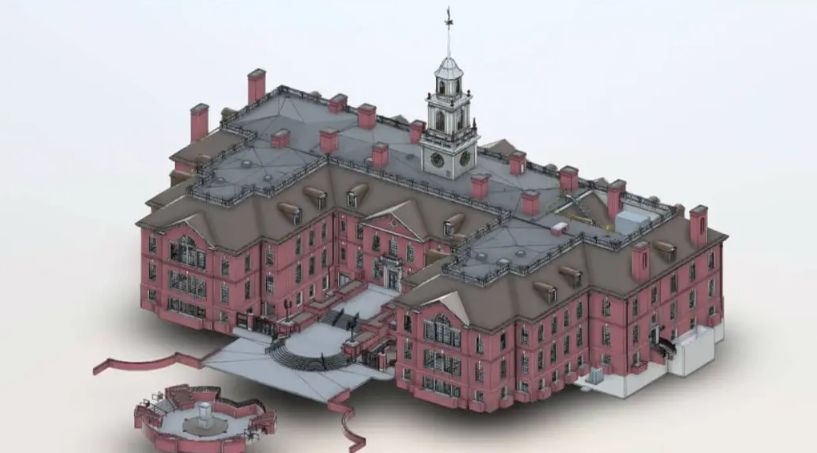
An IFC file is only useful if the team on the other side can open it and find what they expect: walls as walls, ducts as ducts, rooms with their names and areas, every element on the right storey and at the right coordinates. A default export from Revit rarely gets all of that right. ScanM2 builds BIM models in Autodesk Revit and delivers them as IFC prepared for the software, the coordination workflow and the data requirements of the people who will use them – whether that is an architect in Archicad, a steel detailer in Tekla or a client who requires open formats.
Contact Us Now for a Free Consultation!
If you need a refresher on what IFC is and how the file is structured, read our article IFC Model and File Format Explained. This page is about the practical side: how we set up the export, what we check, and when IFC is the right deliverable.
What We Do
| Service | What it covers |
|---|---|
| Revit to IFC conversion | Export setup, mapping and checking of your existing Revit models |
| IFC modeling | New models in Revit (architecture, structure, MEP) delivered as .ifc and RVT |
| Scan to BIM in IFC | Laser scanning, modeling from the point cloud, delivery in .ifc |
| IFC review | Opening and checking IFC files from other disciplines before coordination |
| IFC to Revit | Rebuilding elements from an IFC reference as native, editable Revit content |
How We Set Up a Revit to IFC Export
Revit can export IFC out of the box, but the defaults are written for no one in particular. Before the first export we agree the requirements with you or with the receiving team, then save the settings as a named configuration so every later issue is exported the same way.
- Schema and model view. IFC 2×3 with Coordination View 2.0 is still widely used and supported by most tools. IFC4 with Reference View suits coordination and viewing, where geometry is exchanged as reference rather than for editing. We use what the receiving software and your BIM execution plan ask for, not what is newest.
- Category to IFC class mapping. Each Revit category, and where needed each family, is mapped to the correct IFC class and predefined type – for example IfcWall, IfcSlab, IfcBeam, IfcDuctSegment or IfcFlowTerminal. Generic models and in-place elements are the usual problem: left unmapped, they arrive as IfcBuildingElementProxy, which other teams cannot filter or classify.
- Storeys. Only the levels that are real building storeys are exported as IfcBuildingStorey, so elements are not spread across reference levels and work planes.
- Spaces. Rooms or spaces are exported as IfcSpace with names, numbers and areas, when the recipient needs them for area checks, facility data or energy analysis.
- Property sets. We decide which data travels with each element: IFC common property sets, Revit properties, and your own parameters in user-defined property sets, with names agreed in advance. Empty or duplicated parameters are cleaned up before export.
- Coordinates and origin. We agree whether the export uses shared coordinates, the project base point or the survey point, and check that the model sits where the other disciplines expect it. A model exported far from the origin, or rotated against the others, is one of the most common reasons federation fails.
- Export scope. We export from a dedicated 3D view with the right phase and design options, so temporary elements, annotation helpers and demolished parts do not end up in the file.
How We Check the IFC Before Delivery
An export that finishes without errors is not the same as a correct file. Before delivery we open the IFC outside Revit, in tools such as Solibri, BIMcollab Zoom or Navisworks, depending on what the recipient uses.
- Classes and types – no unexpected proxies, every discipline filterable by IFC class.
- Spatial structure – site, building and storeys in order, every element on the correct storey.
- Geometry – nothing missing, doubled or distorted, openings in the right walls and slabs.
- Properties – agreed property sets and values present on the right elements.
- Location – the model overlays the other disciplines’ models at the agreed coordinates.
Problems found in the check are fixed in the Revit model or in the export settings, not patched in the IFC file. When several parties work on the project, comments can be exchanged as BCF issues, so each one points to a specific element and view. We do not claim to certify IFC files; we check them against the requirements you give us and list what was checked.
Native Revit or IFC: Which Do You Need?
IFC and RVT are not competitors. In most projects we deliver both, and the question is which one each party works with.
| Situation | Better deliverable | Why |
|---|---|---|
| Your team continues the design in Revit | RVT, plus IFC for others | Native families, parameters and views stay editable |
| The architect uses Archicad or Allplan | IFC | Opens as a reference or as elements in their software |
| Steel or precast detailing in Tekla | IFC | Tekla works with IFC references for coordination |
| Clash detection across disciplines | IFC or NWC | Models from different tools are combined in one place |
| Client or contract requires open formats | IFC, plus RVT if agreed | Open, vendor-neutral record of the model |
| Facility or asset data handover | IFC with agreed property sets, plus RVT | Data structured for the client’s systems |
Keep in mind that IFC is an exchange format. It is not designed for full round-trip editing, so the team that owns the model keeps working in its native software and issues a new IFC at each milestone.
IFC for Clients Who Require Open Formats
Some owners, including public agencies, ask for model deliverables in an open format so they are not tied to one vendor’s software. Requirements differ from client to client and project to project – schema, model view, property sets, classification, file naming. We do not assume them: we work from your client’s BIM requirements or execution plan, set up the export to match, and tell you early if something in the requirements cannot be delivered from Revit as asked.
Scan to BIM Delivered in IFC
For existing buildings we combine IFC delivery with laser scanning. We scan with FARO laser scanners, with typical accuracy of the registered point cloud of ±2–3 mm, build the Revit model from the point cloud and deliver it as .ifc together with RVT and the point cloud. We travel to sites in any US state, or we work with point clouds your team or another scanning provider already has. More about this workflow on our Scan to BIM services page.
The same applies to industrial and oil & gas facilities: piping, equipment and steel modeled from point clouds can be issued as IFC for teams that use other plant or structural software.
Families and Clash Detection
Clean IFC starts with clean content. If your project relies on manufacturer products, families built with correct categories and parameters export to the right IFC classes without extra mapping work – see Revit families for manufacturers and Revit family creation services. Once all disciplines are in IFC, the models can be combined for coordination; see our BIM clash detection services.
What You Receive
| Deliverable | Details |
|---|---|
| IFC file(s) | Schema and model view as agreed, one file per discipline or a combined file |
| Revit model (RVT) | Native model in your Revit version, if included in the scope |
| Export configuration | Saved IFC export settings and mapping, so your team can re-export the same way |
| Property set definition | List of exported property sets and parameters |
| Check report | What was checked, in which viewer, and any open items |
| BCF issues | On request, for coordination comments |
FAQ
What is included in your IFC modeling services?
Should we use IFC 2×3 or IFC4?
Why do elements appear as IfcBuildingElementProxy after export?
Will the IFC model be at the right coordinates?
How do you check the IFC file?
Can our Archicad or Tekla team work with your model?
Can you convert an IFC file into an editable Revit model?
Can you scan our building and deliver the model in IFC?
Send Us Your Project
Tell us who will receive the IFC and which software they use, what your client or BIM execution plan requires, and what you already have – Revit models, IFC files from other teams or a point cloud. We review it, agree the export settings and checks with you, and send a quote based on the scope.

