
Revit Modeling from Point Cloud: What Should Be Modeled and What Shouldn’t

Why Revit Modeling from Point Cloud Needs a Clear Scope
One of the most common misconceptions in Point Cloud to BIM projects is the belief that everything visible in a point cloud should be modeled in Revit.
Modern laser scanners capture millions of points and represent nearly every visible surface of a building. However, creating a BIM model is not the same as reproducing every point collected during scanning.
Successful Revit modeling requires a clear understanding of project objectives, required deliverables, and the level of detail needed by architects, engineers, contractors, or facility managers.
Without a clearly defined scope, projects often become more expensive, take longer to complete, and generate models that are difficult to use in practice.
Why Not Everything Visible in the Point Cloud Should Be Modeled
A point cloud captures reality exactly as it exists at the time of scanning.
This includes:
- structural elements;
- architectural features;
- MEP systems;
- furniture;
- equipment;
- temporary objects;
- surface irregularities;
- construction tolerances.
Not all of this information provides value for the final BIM model.
The purpose of BIM is to create a structured digital representation that supports design, construction, coordination, and facility management—not to recreate every visible detail.
Over-modeling often leads to:
- larger file sizes;
- slower project performance;
- longer modeling times;
- increased project costs;
- unnecessary complexity.
What Should Be Modeled


The answer depends on project requirements, but most Scan-to-BIM projects typically include the primary building geometry.
Common elements include:
Architectural Elements
- walls;
- floors;
- ceilings;
- doors;
- windows;
- stairs;
- elevators;
- roof structures.
These elements form the foundation of most existing conditions models.
Structural Elements
- columns;
- beams;
- slabs;
- foundations;
- steel structures;
- load-bearing walls.
Structural modeling is particularly important for renovation, expansion, and engineering analysis projects.
MEP Systems
When required, BIM models may also include:
- ductwork;
- piping;
- cable trays;
- electrical systems;
- HVAC equipment;
- mechanical rooms.
The scope should always be defined before modeling begins.
What Usually Should Not Be Modeled
Many elements visible in a point cloud add little value to the final BIM deliverable.
Typical examples include:
- loose furniture;
- temporary equipment;
- decorations;
- cables not required for coordination;
- small fixtures;
- clutter;
- temporary construction materials;
- minor surface imperfections.
In most projects, these elements increase modeling time without providing meaningful project benefits.
The goal is to model information that supports decision-making, not every object captured during scanning.
How LOD Defines the Modeling Scope

Level of Development (LOD) plays a critical role in determining what should be modeled.
Different projects require different levels of detail.
LOD 200
Suitable for:
- conceptual planning;
- space management;
- preliminary design.
Focuses on general geometry rather than precise detail.
LOD 300
Commonly used for:
- renovation projects;
- design coordination;
- construction planning.
Provides accurate geometry suitable for most BIM workflows.
LOD 350
Often required for:
- advanced coordination;
- clash detection;
- complex engineering projects.
Includes more detailed relationships between building systems.
Choosing the correct LOD helps avoid unnecessary modeling work while ensuring the model meets project requirements.
Understanding the differences between LOD 200, LOD 300, LOD 350, and LOD 400 is critical when planning a Scan-to-BIM project. Many project teams assume that a higher level of detail automatically creates a better BIM model, but this is not always true. The appropriate LOD depends on project objectives, deliverables, and budget requirements. Learn more in our guide: BIM Level of Detail Explained: When More Detail Stops Adding Value.
Architectural, Structural, and MEP Priorities
Different disciplines focus on different information.
Architects typically require:
- room layouts;
- walls;
- doors;
- windows;
- façade elements.
Structural engineers focus on:
- columns;
- beams;
- structural framing;
- slabs.
MEP teams require:
- ducts;
- pipes;
- cable trays;
- equipment locations;
- maintenance clearances.
A successful BIM project identifies these priorities before modeling begins.
This is why many organizations use professional Scan to BIM services to define requirements and establish modeling standards.
Common Mistakes in Revit Modeling from Point Cloud
Several mistakes frequently increase costs and reduce project efficiency.
Modeling Everything
Attempting to recreate every visible object rarely provides value.
Undefined Deliverables
Without clear requirements, project teams often disagree on what should be included.
Incorrect LOD Selection
Choosing a higher LOD than necessary increases time and budget requirements.
Ignoring Project Objectives
A model created for renovation differs significantly from a model used for facility management or digital twin development.
Poor Communication Between Teams
Architects, engineers, contractors, and owners should agree on scope before modeling starts.
How to Define the Right Scope Before Modeling Starts
Before beginning a Point Cloud to BIM project, it is important to answer several questions:
- What is the purpose of the model?
- Which disciplines need to use it?
- What level of detail is required?
- Which systems must be included?
- What deliverables are expected?
- Will the model be used for coordination, construction, or facility management?
These decisions have a direct impact on project cost, timeline, and final model usability.
Professional point cloud to BIM services help establish these requirements early and ensure that modeling efforts remain aligned with project goals.
Why Accurate Scope Definition Improves BIM Projects
A properly defined modeling scope allows project teams to:
- reduce costs;
- improve model performance;
- shorten delivery times;
- simplify coordination;
- avoid unnecessary complexity;
- focus on information that matters.
Rather than creating an overly detailed model, the objective should be to create a useful model.
This principle applies to renovation projects, industrial facilities, commercial buildings, infrastructure assets, and digital twin workflows.
From Point Cloud to Practical BIM Deliverables
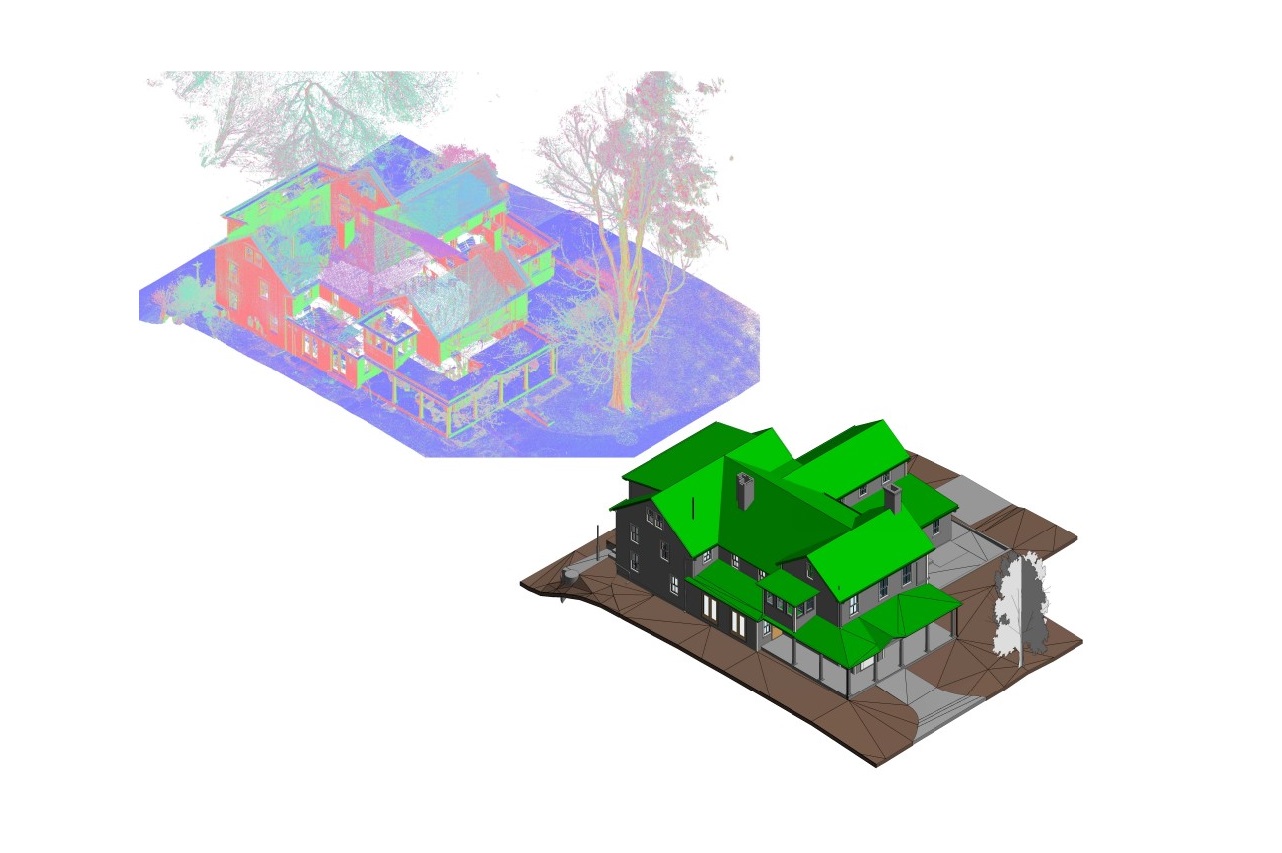
Point cloud data provides an accurate representation of existing conditions, but the value of BIM comes from transforming that information into a structured, usable model.
Successful BIM modeling services focus on creating deliverables that support real project needs rather than reproducing every point captured during scanning.
By defining scope, LOD, and project objectives from the start, organizations can obtain BIM models that are accurate, efficient, and fit for purpose.
Need Revit Modeling from Point Cloud?
ScanM2 provides laser scanning, point cloud processing, Scan-to-BIM workflows, and BIM modeling services for existing buildings, renovation projects, industrial facilities, and infrastructure assets.
Our team helps clients determine the right modeling scope, required LOD, and project deliverables to create BIM models that support design, construction, coordination, and facility management.
Contact ScanM2 to discuss your next Revit modeling or Point Cloud to BIM project.
FAQ
Should everything visible in a point cloud be modeled?
What determines what should be modeled?
Why is LOD important?
Can MEP systems be modeled from point cloud data?
What is the most common mistake in Point Cloud to BIM projects?
How can ScanM2 help?

3D Laser Scanning for Building Renovation: What Should Be Captured Before Design Starts?
05.10.2026
Renovation projects rarely begin with a completely reliable picture of the existing building. Original drawings may be incomplete or outdated, previous modifications may not have ...

3D Laser Scanning Accuracy: What Level of Accuracy Does Your Project Need?
02.10.2026
3D laser scanning can capture millions of measurements across a building, industrial facility, or individual piece of equipment. But a large number of points does ...

How As-Built BIM Models Support Facility Management and Building Renovation
27.09.2026
An accurate digital model of an existing building can remain useful long after the initial survey is complete. When an as-built BIM model reflects the ...

INTERGEO: How Laser Scanning Is Becoming a Foundation for Management and Decision-Making
24.09.2026
ScanM2 once again took part in INTERGEO, which was held in Munich this year. For us, the event is an opportunity to meet with partners, ...

