
Point Cloud Cleaning Explained: How Scan Data Is Prepared for CAD and BIM
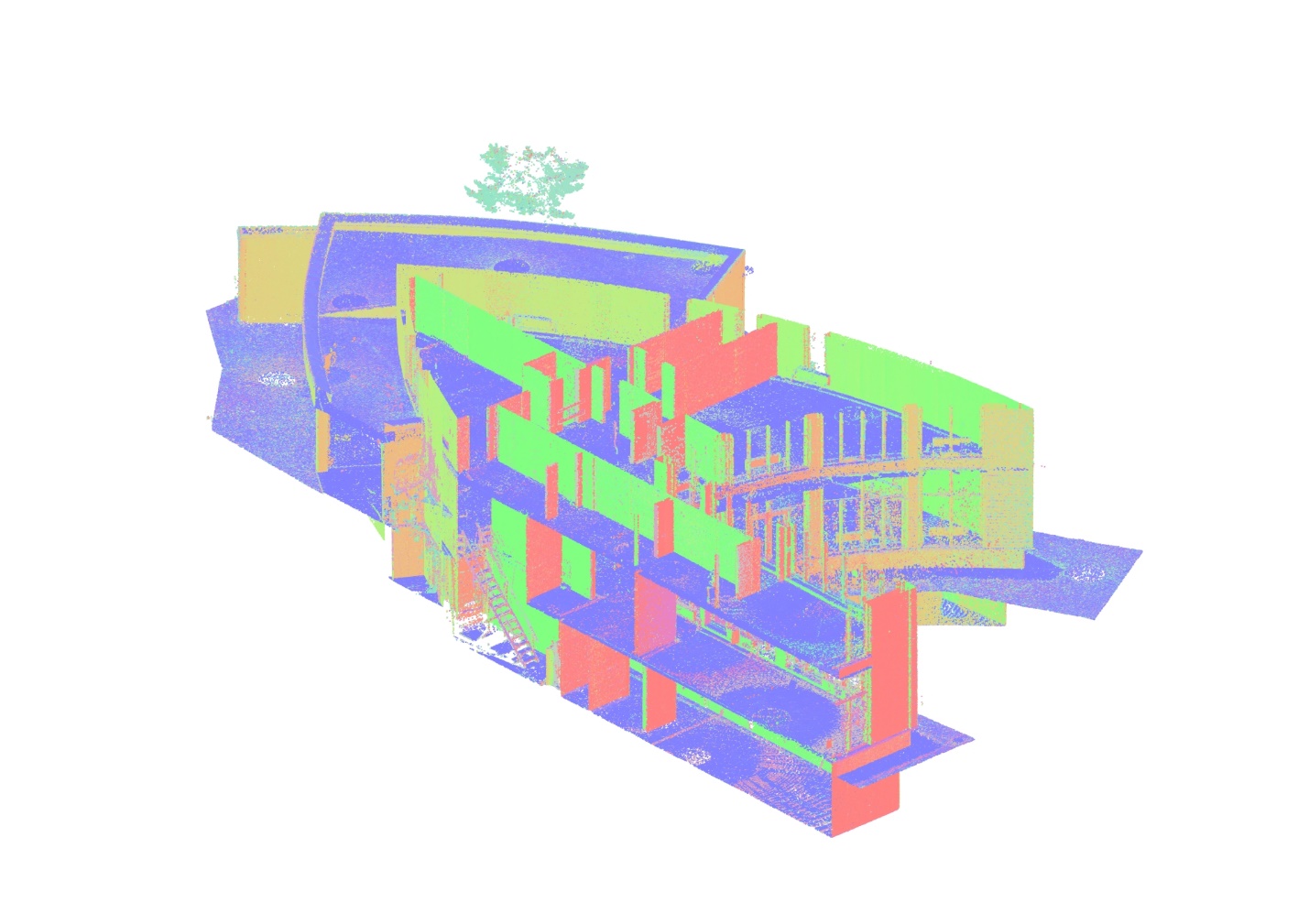

3D laser scanning can capture millions or even billions of measurement points across an existing building, industrial facility, or construction site. However, the raw dataset produced during scanning is not always ready to be used directly for CAD drafting or BIM modeling.
Along with the geometry of the object being surveyed, scans may contain people, vehicles, temporary equipment, reflections, vegetation, moving objects, and other data that are irrelevant to the final documentation.
This is why point cloud cleaning is an important stage of the point cloud processing workflow. It helps transform registered scan data into a clearer and more manageable dataset that can be used as a reliable reference for drawings and models.
For existing buildings, the typical workflow can be represented as:
3D Laser Scanning → Point Cloud Registration → Point Cloud Cleaning → CAD or BIM
What Is Point Cloud Cleaning?
Point cloud cleaning is the process of identifying and removing unnecessary, incorrect, or irrelevant points from a 3D scanning dataset while preserving the geometry required for the project.
A laser scanner records visible surfaces within its field of view. It does not automatically understand which objects belong to the permanent building and which were temporarily present during the survey.
For example, a scan of an operating facility may capture:
- people moving through the area;
- vehicles and mobile equipment;
- temporary construction materials;
- furniture;
- reflections from glass or polished surfaces;
- vegetation visible through openings;
- objects located outside the required survey area;
- isolated or erroneous measurement points.
Not all of this information needs to be included in the dataset used for further work.
Cleaning helps specialists focus on the geometry that is relevant to the required deliverables.
Why Do Raw Point Clouds Need to Be Cleaned?
Raw scan data can be extremely dense. Depending on the size and complexity of the project, a point cloud may contain hundreds of millions or billions of points.
More data does not automatically mean a better dataset.
If unnecessary points remain in the cloud, they can make navigation and interpretation more difficult and may increase the amount of data that needs to be processed by CAD and BIM software.
Point cloud cleaning is therefore performed to improve the usability of the dataset without removing information required for accurate documentation.
The objective is not to make the point cloud visually perfect. The objective is to create a clean, reliable reference dataset appropriate for the intended use.
A point cloud prepared for architectural floor plans, for example, may have different requirements from a dataset intended for detailed MEP modeling or industrial equipment documentation.
What Types of Data Are Typically Removed?

The exact cleaning process depends on the site and project requirements, but several types of unwanted data are commonly encountered.
Moving People and Vehicles
People walking through a building or vehicles moving around a site can appear in individual scans.
Because these objects are not part of the permanent geometry, their points may be removed when they interfere with the required documentation.
Temporary Objects
Construction materials, movable equipment, temporary barriers and other objects may be present during scanning but may not be relevant to the final model or drawings.
Whether they should be removed depends on the purpose of the survey.
Reflections and Measurement Noise
Glass, mirrors, polished metal and other reflective surfaces can produce irregular or misleading measurements.
These areas require particular attention because apparent points may not represent actual physical geometry.
Data Outside the Required Area
A scanner may capture surfaces well beyond the area required for the project.
For example, when documenting an individual building, portions of neighboring buildings, surrounding streets or distant objects may also appear in the scans.
Removing irrelevant areas can make the working dataset easier to manage.
Isolated Points
Individual points or small groups of points that do not correspond to recognizable physical surfaces can sometimes occur in scan data.
These may be identified and removed during processing when they are clearly unrelated to the surveyed geometry.
Point Cloud Cleaning vs Point Cloud Registration
Cleaning and registration are two different stages of point cloud processing, although they are closely connected.
During a laser scanning survey, the scanner is positioned at multiple locations to capture the entire object. Each scan initially represents the environment from a particular scanner position.
Point cloud registration aligns these individual scans within a common coordinate system and combines them into a consistent dataset.
Point cloud cleaning, on the other hand, deals with the quality and relevance of the information contained within that dataset.
In simplified form:
Registration = aligning the scans
Cleaning = removing unnecessary or incorrect data
Registration normally needs to be completed and verified before the combined point cloud can serve as a reliable basis for detailed CAD or BIM work.
How Is a Point Cloud Cleaned?
Point cloud cleaning is not a single automated operation. It usually involves a combination of software tools, automated filtering and manual review.
1. Review of the Registered Point Cloud
The first step is to inspect the registered dataset and identify areas containing unnecessary or questionable information.
Specialists review the cloud from different viewpoints and compare overlapping scan areas where necessary.
2. Removal of Irrelevant Areas
Parts of the dataset outside the required project scope can be removed or separated.
This may include surrounding buildings, exterior areas, temporary objects or other geometry that is not needed for the deliverable.
3. Noise Filtering
Software tools can help identify isolated points and certain types of measurement noise.
Automated filtering can accelerate processing, but the results still need to be reviewed to ensure that valid building geometry has not been removed.
4. Manual Cleaning
Some situations cannot be handled reliably through automatic filters alone.
Complex industrial environments, dense MEP systems, reflective surfaces and areas with many temporary objects often require manual inspection.
The specialist must distinguish between unwanted scan data and actual building components that need to remain available for modeling.
5. Final Quality Control
After cleaning, the dataset is reviewed again before being used for subsequent processing, CAD drafting or BIM modeling.
The purpose of this stage is to ensure that the required geometry remains intact and that cleaning has not introduced gaps or removed important information.
Does Point Cloud Cleaning Affect Accuracy?
Cleaning should not reduce the geometric accuracy of the measured building when it is performed correctly.
The process does not involve arbitrarily changing the position of valid measurement points. Instead, it focuses on removing information that does not represent the required permanent geometry or is clearly erroneous.
However, excessive filtering can become a problem.
If valid points are removed from edges, small pipes, structural connections, equipment or other detailed elements, important information may be lost.
This is why point cloud cleaning should always be performed according to the intended use of the data.
For Scan to BIM projects, for example, the team preparing the point cloud needs to understand which elements will later be modeled and what level of detail is required.
How Point Cloud Cleaning Prepares Data for CAD
Clean point clouds can be used as a geometric reference for producing 2D documentation of existing conditions.
Depending on the project, CAD deliverables may include:
- floor plans;
- elevations;
- sections;
- reflected ceiling plans;
- roof plans;
- site plans;
- structural drawings;
- MEP documentation.
Removing irrelevant data makes it easier to identify the surfaces and elements required for drafting.
For example, when producing a floor plan, specialists need to clearly identify walls, columns, openings, stairs and other permanent building elements. Temporary objects or excessive noise can make this interpretation more difficult.
The cleaned point cloud therefore acts as an accurate measurement reference from which CAD documentation can be developed.
How Point Cloud Cleaning Prepares Data for BIM

The same principle applies to Scan to BIM workflows.
A BIM specialist uses the point cloud as a spatial reference for creating architectural, structural and MEP elements.
Depending on the project requirements, these may include:
- walls and floors;
- columns and beams;
- roofs;
- doors and windows;
- ceilings;
- pipes;
- ducts;
- equipment;
- other visible building components.
A well-prepared point cloud helps the modeler distinguish permanent building geometry from irrelevant objects captured during scanning.
This becomes particularly important in complex mechanical rooms, industrial facilities, data centers and other environments containing dense engineering systems.
The point cloud itself does not automatically become a BIM model. It provides the measured geometric foundation from which the required BIM elements are created.
How Much Cleaning Does a Point Cloud Need?
There is no universal level of cleaning that applies to every project.
The required amount of processing depends on factors such as:
- the purpose of the survey;
- complexity of the building;
- site conditions during scanning;
- density of the point cloud;
- required CAD or BIM deliverables;
- required level of detail;
- amount of temporary equipment or activity on site;
- presence of reflective surfaces;
- size of the project area.
An empty office building, for example, may require relatively little cleaning.
An operating industrial facility with workers, machinery, temporary materials and dense MEP systems may require substantially more review and processing.
For this reason, point cloud preparation should always be based on the requirements of the final deliverable rather than on a fixed cleaning procedure.
Point Cloud Cleaning for Existing Buildings
Existing buildings are often more challenging to document than new construction.
Spaces may contain furniture, operating equipment, stored materials, temporary installations and building systems added during previous renovations.
At the same time, these projects frequently require accurate documentation because the original drawings are incomplete or no longer correspond to actual conditions.
3D laser scanning provides the measurements needed to document the building, while registration and cleaning prepare those measurements for further use.
The resulting workflow may include:
Laser Scanning → Registration → Cleaning → Point Cloud Processing → CAD Documentation / BIM Modeling
This allows architects, engineers and contractors to work from measured existing conditions rather than relying solely on outdated drawings.
Point Cloud Processing at ScanM2
ScanM2 processes 3D laser scanning data for use in existing building documentation, CAD drafting and BIM modeling.
Depending on the project requirements, point cloud processing can include registration, cleaning, organization, quality control and preparation of datasets for subsequent modeling or drafting.
The processed data can then serve as the basis for deliverables such as:
- registered point clouds;
- CAD drawings;
- floor plans;
- elevations and sections;
- Revit models;
- BIM models;
- IFC models;
- existing building documentation.
The required workflow and output formats are determined according to the type of facility, project scope and intended use of the data.
Conclusion
Point cloud cleaning is an important step between capturing a building with a laser scanner and using the resulting data for CAD or BIM.
Raw scans may contain people, vehicles, temporary objects, reflections, isolated points and information outside the required project area. Cleaning helps remove irrelevant data while preserving the measured geometry needed for documentation and modeling.
Together with registration and quality control, this process transforms raw 3D scanning data into a practical reference for CAD drawings, Scan to BIM, IFC models and existing building documentation.
FAQ
What is point cloud cleaning?
Why do point clouds need cleaning?
Is point cloud cleaning the same as registration?
Can point cloud cleaning reduce accuracy?
Can point clouds be cleaned automatically?
Is a cleaned point cloud ready for BIM modeling?

How 3D Laser Scanning Measures Floor Flatness and Levelness
22.09.2026
Floor flatness and levelness can directly affect equipment installation, racking systems, automated material handling, production lines, flooring systems, and other construction activities that depend on ...

How 3D Laser Scanning Supports Construction Claims and Dispute Resolution
24.08.2026
Construction claims and disputes often arise when project participants disagree about what was actually built, when specific work was completed, whether installed elements match the ...

What Makes a Point Cloud Ready for BIM Modeling
08.06.2026
Many project teams assume that once a building has been scanned, the data is immediately ready for BIM modeling. In reality, the quality of the ...

What Architects Should Check Before Ordering a Scan-to-BIM Model
25.05.2026
Why Good Scan-to-BIM Projects Start Before Scanning Many architects approach Scan-to-BIM workflows expecting that laser scanning automatically produces a fully coordinated BIM model ready for ...

